Fixing Multi-GPU performance, part 1
Performance on “secondary” GPUs has historically been suboptimal on Linux, especially with external GPUs. Let’s take a look at why it’s slow, and how we’re finally fixing it.
How Multi-GPU even works
To know how things work with multiple GPUs, we first need to look at how applications present images in single GPU systems.
With Wayland, the linux-dmabuf protocol is used for sharing images from applications to the compositor. The compositor advertises which GPU it’s using, and a list of drm formats1 and format modifiers2 it can make use of.
The application then allocates a dma-buf (direct memory access buffer) for each image with one of the supported formats + modifiers on the GPU of the compositor, and sends the compositor file descriptors for these buffers to share them.
This works quite well, but only for single GPU systems. In linux-dmabuf version 5, the compositor can only advertise one GPU as being usable! The app could still attempt to pass the buffer of any GPU to the compositor, but that can fail, requiring fallbacks, and it can cause really big performance issues.
Why it’s slow
When you import a dma-buf to a GPU, the kernel tries to be helpful and automatically ensures for you that the GPU you’re using can access the buffer. This sounds nice, and can be useful, but it’s also the source of all our performance problems.
Let’s say you have a laptop with an integrated GPU, and a dedicated GPU. When you start a game on the dedicated GPU, what would happen is
- the game allocates a buffer on the dedicated GPU
- it passes that buffer to the compositor
- the compositor imports the buffer into the integrated GPU
To make step 3 work, the kernel would move3 the buffer to system memory. This can be really terrible for performance, since system memory is terribly slow in comparison to video memory, and the dedicated GPU has to go through the PCIe bus to access it, which has high latency.
To solve that problem, Vulkan and OpenGL drivers compare the GPU the application is using with the one the compositor advertises. If they’re not the same, then the driver will not share the buffers on the GPU with the compositor, but actually create a copy in system memory and share that copy with the compositor instead. So this would be
- the game allocates a buffer on the dedicated GPU
- the driver copies the buffer to another buffer in system memory
- it passes that other buffer to the compositor
- the compositor imports the buffer into the integrated GPU
Now imagine you’re not playing the game on your laptop display, but you have an external display connected to the dedicated GPU. The HDMI port on a lot of laptops is wired to the dedicated GPU, so this is a really common scenario. What happens in that case is
- the game allocates a buffer on the dedicated GPU
- the driver copies the buffer to another buffer in system memory
- it passes that other buffer to the compositor
- the compositor imports that other buffer into the integrated GPU
- the compositor composites with the integrated GPU
- the compositor copies the composited result to the dedicated GPU
So your game gets copied to system memory and back to video memory, for no real reason. The performance hit caused by that isn’t great in general, but it gets so much worse with external GPUs.
When all you have is one USB C cable to transfer data from and to the GPU, with high resolution monitors the bandwidth of that cable can be too small even for copying in one direction! Going in both directions completely kills performance. For example, I have a setup with
- a Framework laptop 13
- a rx 5700 XT in an external GPU enclosure
- a 5120x1440 monitor at 120Hz connected to the external GPU
If I start vkcube (a super simple test app) on the external GPU, move it to the monitor and make it fullscreen, it only reaches 55fps!
How to fix it
In principle, we “just” need to stop the driver from copying the buffer around, and instead have it pass the original buffer from the dedicated GPU to the compositor. That’s exactly what I proposed version 6 of the linux-dmabuf protocol for: The compositor can support a list of GPUs instead of just one, and the application can tell the compositor which GPU it should import a given buffer into.
This all sounds nice and simple in theory, but as always, it wasn’t quite that simple in practice. There are basically three problems that needed to be solved for this change to be useful:
- the driver needs to not do the copies unless actually necessary
- the compositor needs to do the copies when required
- to actually get any performance gains, the compositor needs to skip the copies whenever possible
Thankfully, I didn’t need to do this alone. Victoria Brekenfeld from System76 implemented support for the protocol in Mesa and Smithay, the library used by the cosmic compositor.
Unfortunately, it took a long time to support the protocol in a useful way in KWin. I needed to make it
- aware of multiple GPUs beyond just displaying on them
- properly handle GPU hotplug with that new infrastructure
- deal with all the weird GPU setups in embedded systems
- track which GPU each buffer is on
- have generic multi GPU copy infrastructure
- make those multi GPU copies actually as fast as the copies Mesa does internally
- deal with GPU resets correctly while doing multi GPU copies
- actually implement the Wayland protocol bits
Some of this was just moving code from out drm backend to more generic places, but a lot of it required doing things from scratch. Especially GPU reset handling was challenging because KWin’s effects APIs make a lot of assumptions about OpenGL contexts and didn’t support just stopping rendering a frame once it started.
While working on this, I also added Vulkan support to KWin specifically to make the multi GPU copies as fast as possible, which also took some time. As a positive side-effect though, we now have basic Vulkan infrastructure in KWin that can be used for a future Vulkan renderer.
Finally, just over 2 years after I first proposed the protocol, we had complete enough implementations to prove it works as expected and the protocol was merged. Since then, the KWin implementation was merged, the Mesa implementation should be merged soon and Nvidia has an (as of time of writing, unreleased) implementation of the protocol in their driver as well.
The actual performance gains
So, how much does this actually help? With vkcube, we go from 55 fps to the full 120 fps of the monitor, but that’s hardly a practically relevant test.
So I fired up Cyberpunk 2077 with the “low” graphics preset and it went from 27 fps with Mesa main to 50 fps with linux-dmabuf v6. That’s more than 80% better performance!
| Mesa main | Mesa with dmabuf v6 |
|---|---|
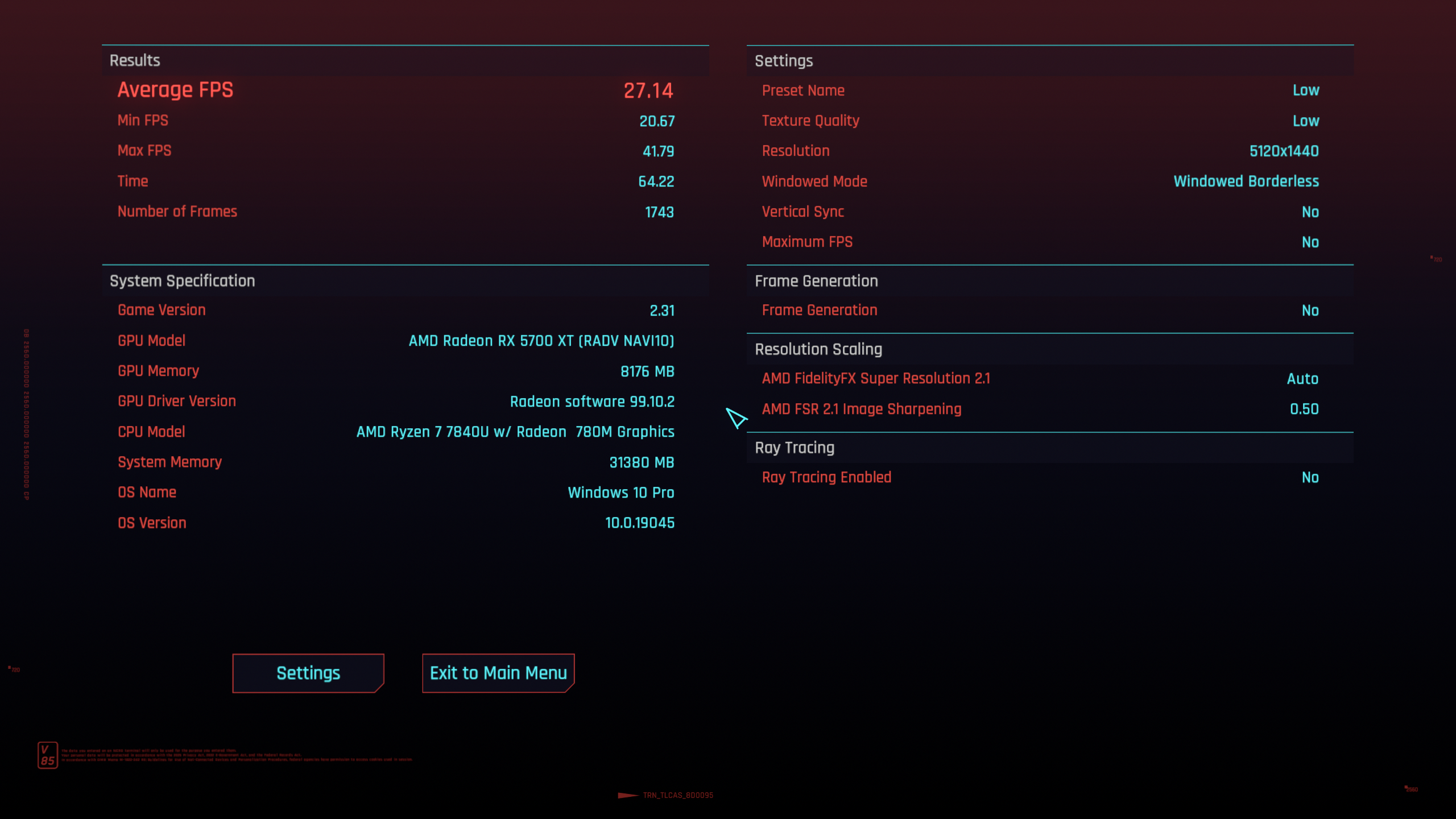 |
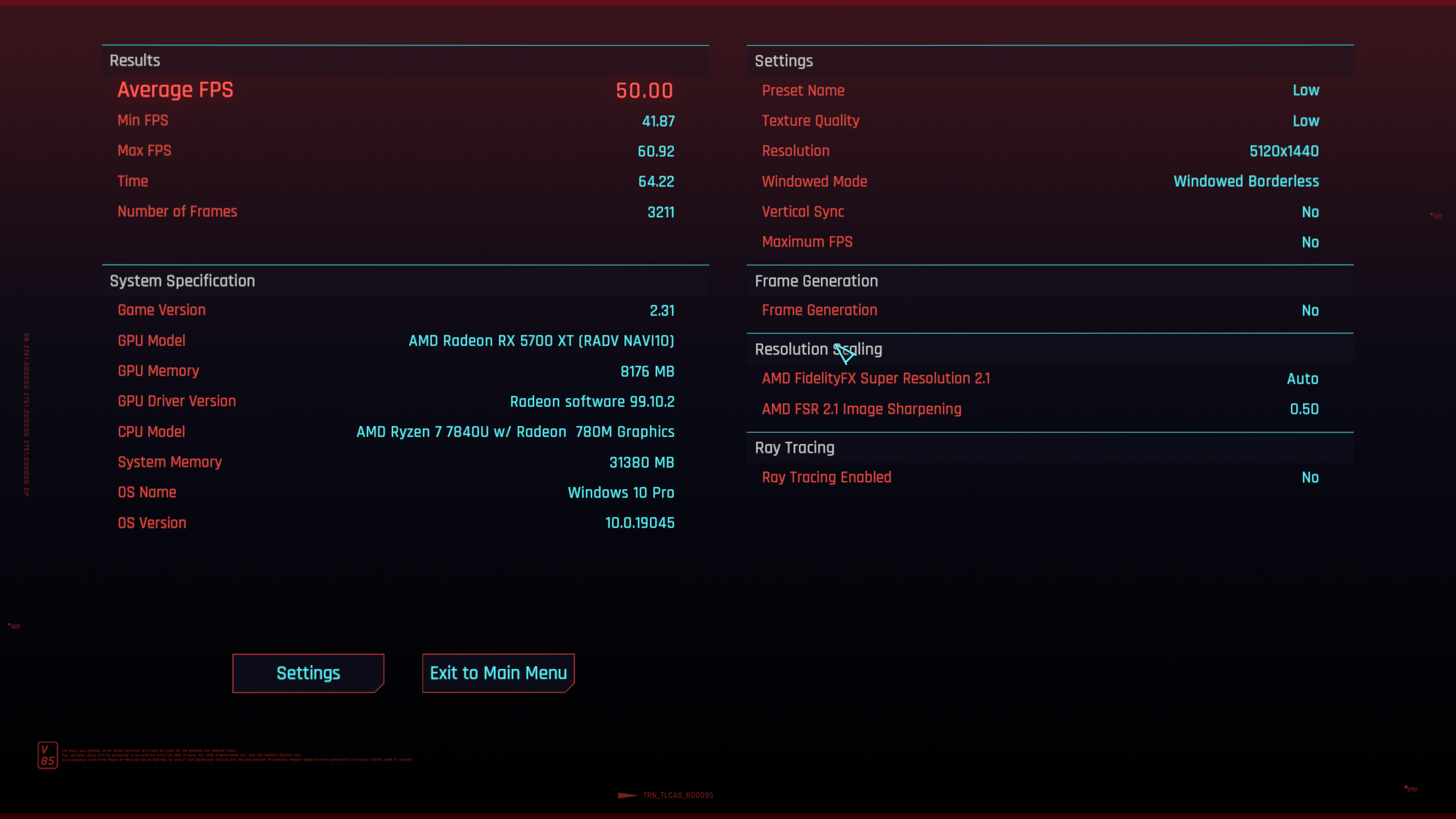 |
From playing around a bit with the graphics settings, it seems likely that the game is bottlenecked by the USB C bandwidth, so the performance uplift could be even better with additional driver optimizations.
I haven’t been able to benchmark the impact of dmabuf v6 on “normal” laptop setups, because I don’t yet have access to a Nvidia Vulkan driver version implementing the protocol, and I don’t have a laptop with a dedicated AMD GPU. If I had to guess though, I’d expect improvements there to be much more moderate, probably something in the 5-10% range. I’ll update this post once I know more.
However, this performance uplift comes with two big caveats…
When does this work?
With the current KWin implementation, compositing always happens on the “primary” GPU. On laptops, by default that’s whatever GPU the internal display was connected to when KWin started. This means you can only get those large benefits if the game gets direct scanout.
My rx 5700 XT doesn’t have support for color pipelines, so I only get the performance benefit if HDR is disabled, night light is disabled and no color profile is used. I already have a merge request to lift that restriction though, stay tuned for part 2 to find out more about that!
There is another caveat though, and that’s a far bigger challenge: Most games still run on X11, and implementing the protocol (in a useful way) in Xwayland is incredibly challenging because of some assumptions X11 makes. I don’t know how that could be fixed, or even if it’s feasible at all, so for now, you can only get these benefits with games using Wayland directly.
For a lot of native games, using SDL_VIDEODRIVER=wayland does the trick, and for most Windows games, you can use Proton forks with the Wine Wayland driver. In my experience, Wine Wayland works really well and even HDR just works™ with it nowadays.